



 (726) 233-6044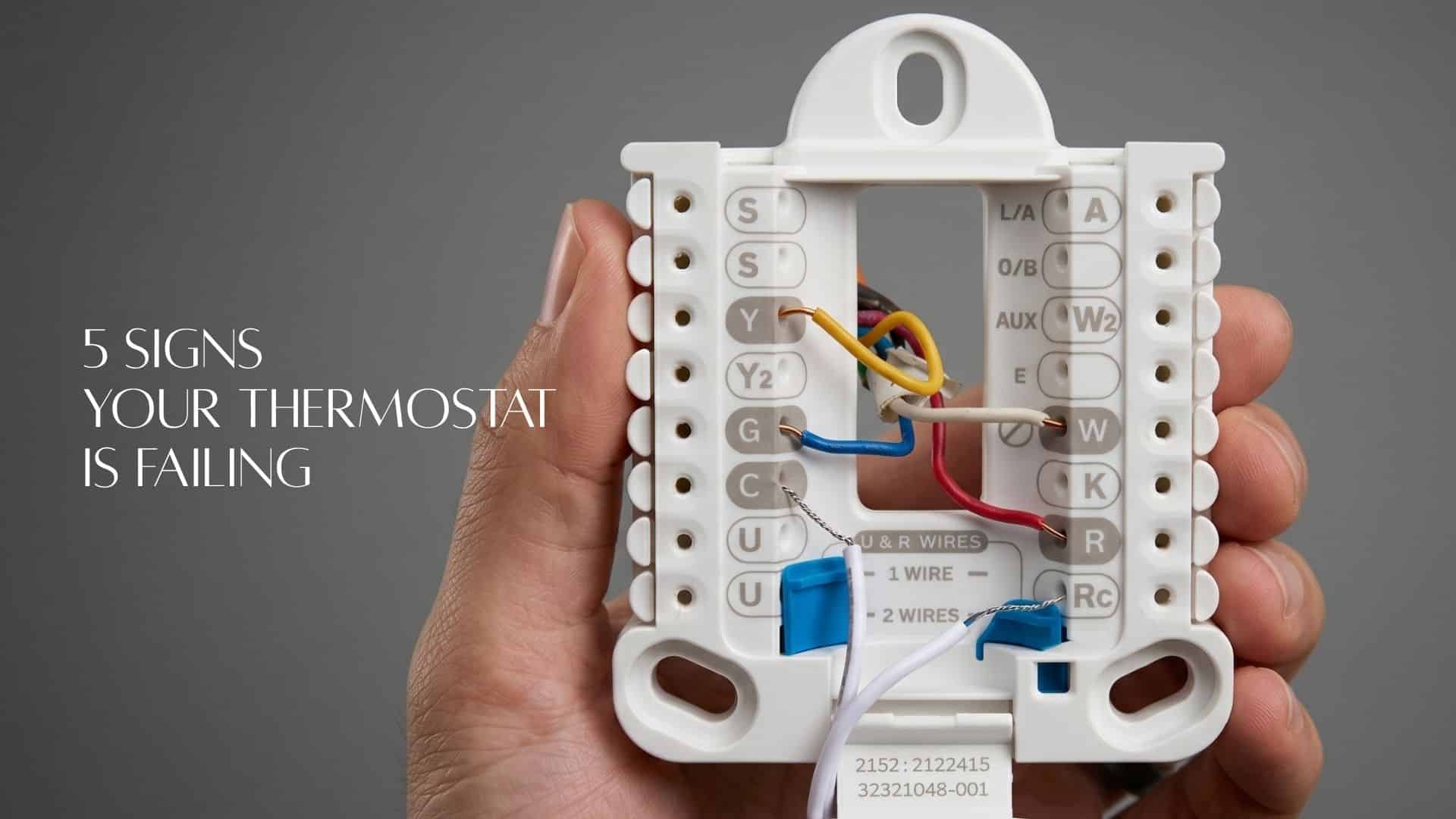
Quick Answer: What Are the Signs of a Failing Thermostat?
The five signs your thermostat is breaking are: (1) your HVAC system won’t turn on or off on command, (2) the temperature reading is consistently wrong, (3) short cycling — the system starts and stops in rapid succession, (4) your energy bills spike with no change in usage habits, and (5) the display is blank, frozen, or responding to inputs it shouldn’t. Most homeowners misdiagnose these as equipment failures and spend money on the wrong repair.
Here’s the problem no HVAC technician will tell you upfront: the most misdiagnosed component in a residential HVAC system isn’t the compressor, the blower motor, or the refrigerant line. It’s the thermostat — the $30–$250 control signal that tells your entire system what to do.
When a thermostat begins to fail, it rarely dies all at once. It degrades. It sends weak signals. It reads the room temperature wrong. It short-cycles. And because the symptoms look exactly like equipment failure, homeowners call for a repair on the wrong component — then wonder why the problem comes back.
This guide covers each warning sign in detail: what causes it, how to confirm the thermostat is the source (not the HVAC equipment), and the exact next step — whether that’s a DIY fix, a calibration adjustment, or a full replacement.
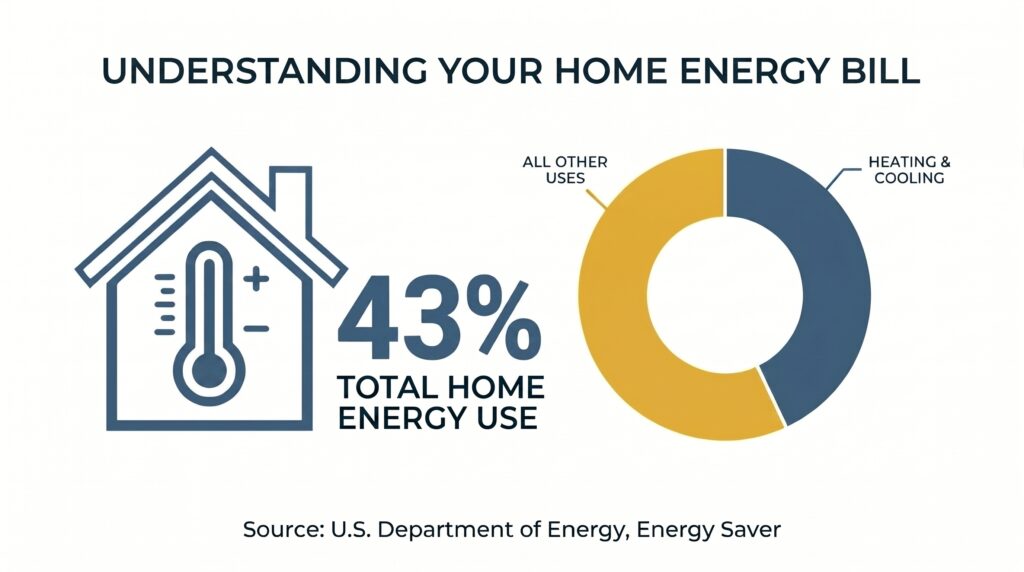
Heating and cooling account for 43% of a typical U.S. home’s total energy bill, according to the U.S. Department of Energy (2024). A thermostat not working is a direct leak into that budget.
Sign #1: Your HVAC System Won’t Turn On or Off on Command
If your HVAC system ignores commands from the thermostat — failing to turn on when called, or failing to shut off when the setpoint is reached — the thermostat’s control wiring or internal relay is likely the cause. Before replacing any HVAC equipment, verify the thermostat is sending a signal at all. This single check eliminates the most common source of unnecessary service calls.
What’s Actually Happening
Your thermostat communicates with your HVAC system via a low-voltage (24V) control circuit. When you set a temperature, the thermostat closes a circuit that signals the furnace, air handler, or heat pump to activate. A thermostat that won’t command the system is either not closing that circuit at all, or closing it intermittently — producing erratic, unreliable behavior that mimics equipment failure.
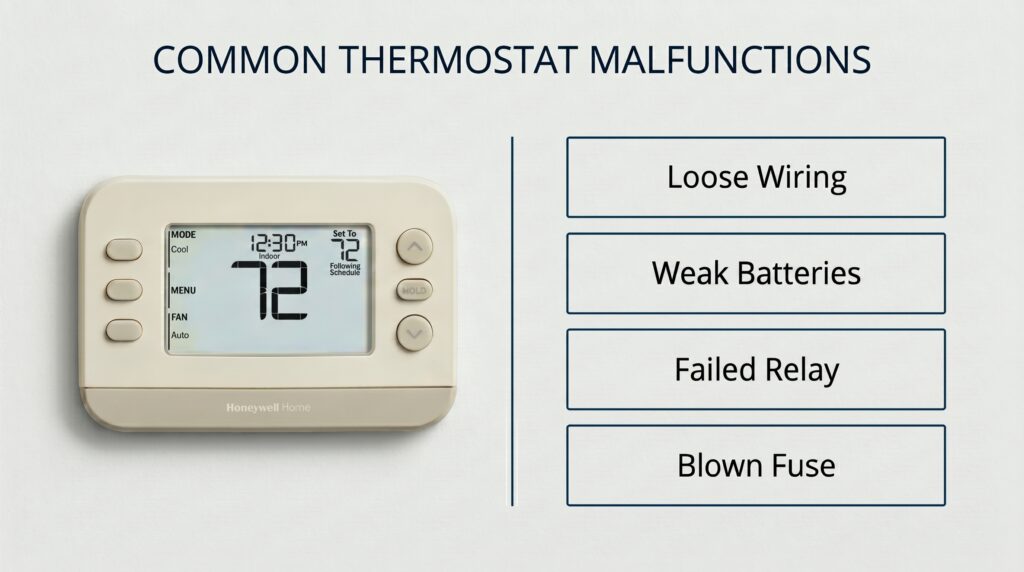
Common underlying causes include:
- Loose or corroded terminal connections — The most frequent culprit. A terminal that vibrated loose over years of use interrupts the control signal without any visible damage to the thermostat itself.
- Dead or weak batteries — Digital thermostats running on batteries can display a reading while lacking sufficient voltage to actually trigger the HVAC relay. Most units require 1.5V per cell; at 1.2V, the display works but the relay doesn’t.
- A failed internal relay or control board — The thermostat’s internal switching mechanism has worn out. Common in units over 10 years old.
- Tripped system switch or blown low-voltage fuse — Not a thermostat fault, but it produces identical symptoms. Check the air handler’s low-voltage fuse (typically a 3A or 5A mini fuse on the control board) before concluding the thermostat is at fault.
How to Confirm the Thermostat Is the Problem — Not the Equipment
- Replace the batteries first, even if the display appears fine.
- Remove the thermostat cover and inspect all terminal connections. Tighten any loose screws and look for green corrosion on wire ends (sign of moisture damage).
- With power off at the breaker, short the R and Y terminals with a small wire. If the compressor activates, the thermostat is the problem — not the AC unit. If the compressor still doesn’t activate, the fault is downstream of the thermostat.
- Check for a blown low-voltage fuse on the air handler control board before ordering a thermostat replacement.
$100–$250
The cost of an initial HVAC service call (diagnostic assessment only, before any repair work), according to Angi’s 2026 national cost data. Thermostat-specific repair costs run $150–$350. Homeowners who bypass thermostat diagnostics and call for an equipment repair often pay this fee only to confirm the equipment was never the problem.
Source: Angi
Sign #2: The Temperature Reading Is Consistently Wrong
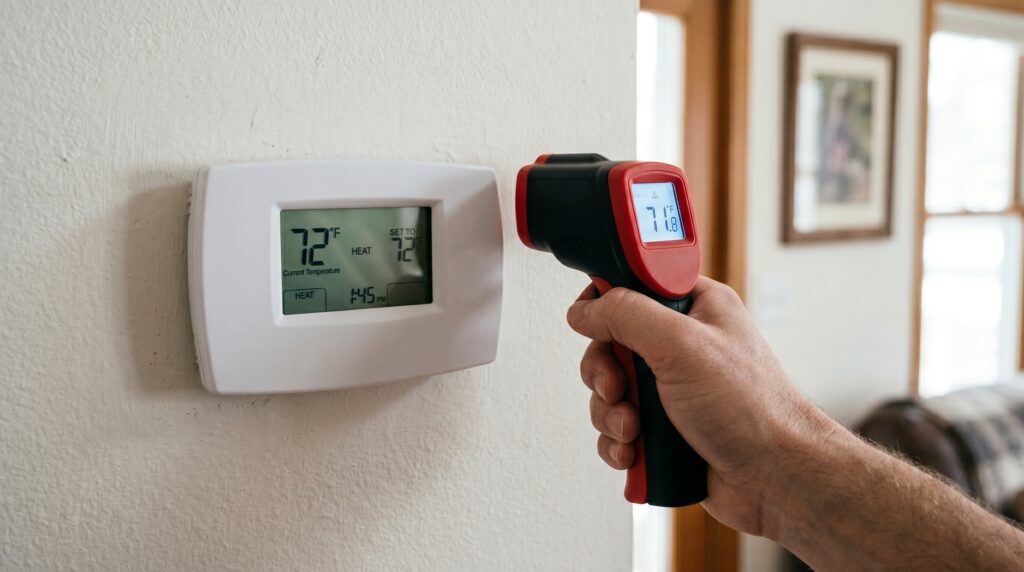
A thermostat that consistently displays a temperature 2°F or more above or below the actual room temperature is miscalibrated — and it’s actively costing you money. The U.S. Department of Energy estimates that each degree of unnecessary heating or cooling increases energy consumption by approximately 1% per 8-hour period. A chronic 3°F error represents a 3% efficiency loss running around the clock.
The Difference Between Miscalibration and a Failing Sensor
These are not the same problem and they don’t have the same fix.
Miscalibration is a gradual drift — the sensor still works, but its readings have shifted from accurate over time due to dust accumulation, minor sensor aging, or a changed environment. Most digital thermostats allow a calibration offset in the installer settings menu that corrects this without any hardware change.
Sensor failure is different: the reading jumps erratically, swings wildly between temperatures in minutes, or gets stuck at a fixed value that doesn’t change even as the room temperature changes. This is a hardware fault. No calibration offset will fix it — the thermostat needs to be replaced.
How to Test It in 15 Minutes
- Turn off all HVAC activity and let the system rest for 15 minutes.
- Place a calibrated reference thermometer (NIST-traceable, ±0.5°F accuracy, $20–$25) within 2 inches of your thermostat face.
- Wait 15–20 minutes. Do not open exterior doors or windows.
- Read both simultaneously.
- A gap of ≤1°F is acceptable. A gap of 1.5–3°F warrants calibration. Over 3°F warrants calibration attempt or replacement evaluation. A reading that fluctuates randomly during the wait period indicates sensor failure — skip calibration and replace.
0.1–0.2°C per year
The typical drift rate of NTC thermistor sensors used in most digital thermostats, under normal operating conditions. A 10-year-old thermostat may read up to 2–4°F off from factory calibration without any physical damage or malfunction.
Source: TE Connectivity
The “False Calibration” Trap
Most homeowners who notice a temperature discrepancy don’t test it — they just nudge the setpoint down a degree or two and adapt. What this actually does is shift the system’s operating target without fixing the underlying error. The HVAC still runs to a wrong measurement. The cycles get longer. The compressor runs harder. And because nothing breaks dramatically, the inefficiency compounds silently for years.
The correct response to a suspected temperature discrepancy is always a direct test with a reference thermometer — not a setpoint adjustment.
Sign #3: Short Cycling — Your System Turns On and Off Too Frequently
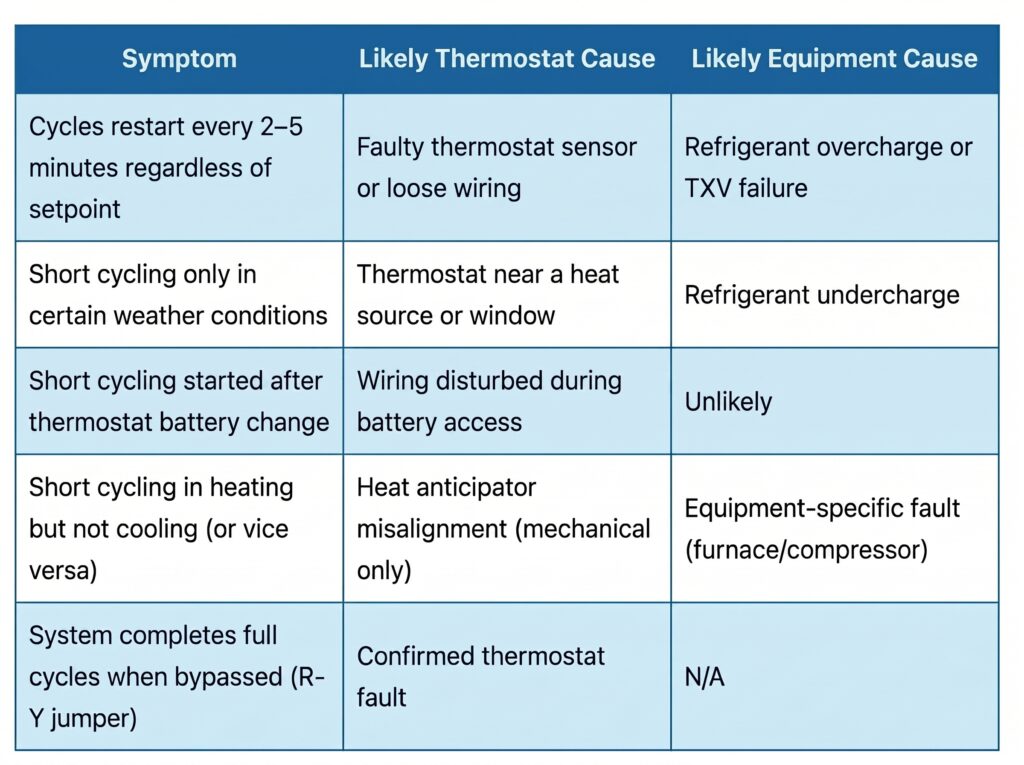
Short cycling is when your HVAC system turns on, runs for 2–5 minutes, shuts off before reaching the setpoint, and then immediately restarts. A healthy system should run in 10–20 minute cycles 2–3 times per hour in moderate weather. Short cycling dramatically increases compressor wear, raises energy consumption, and is one of the leading causes of premature HVAC system failure. A faulty thermostat is a primary cause — and the cheapest one to fix.
Why a Bad Thermostat Causes Short Cycling
Short cycling has several possible causes — oversized equipment, refrigerant issues, a clogged filter. But thermostat-related short cycling has a distinct signature: it starts and stops at irregular intervals that don’t track with the actual room temperature. The thermostat is sending false start or stop signals before the system has time to complete a full cycle.
Thermostat-specific short cycling causes include:
- Misaligned heat anticipator (mechanical thermostats) — The anticipator tells the system to shut off slightly before the setpoint to account for residual heat. If it’s set too high, the system shuts off too early, the room immediately drops, and the cycle restarts. A correctly set anticipator should match the current draw on the furnace control board — typically 0.2–0.6 amps.
- Sensor reading ambient heat from the HVAC system itself — If the thermostat is within 5 feet of a supply vent, the conditioned air blowing past it triggers a false “setpoint reached” reading. The system shuts off, the thermostat returns to actual room temp, and the cycle restarts.
- Intermittent internal electrical fault — A thermostat with a deteriorating control board sends spurious stop signals mid-cycle. This is a hardware failure and calibration won’t fix it.
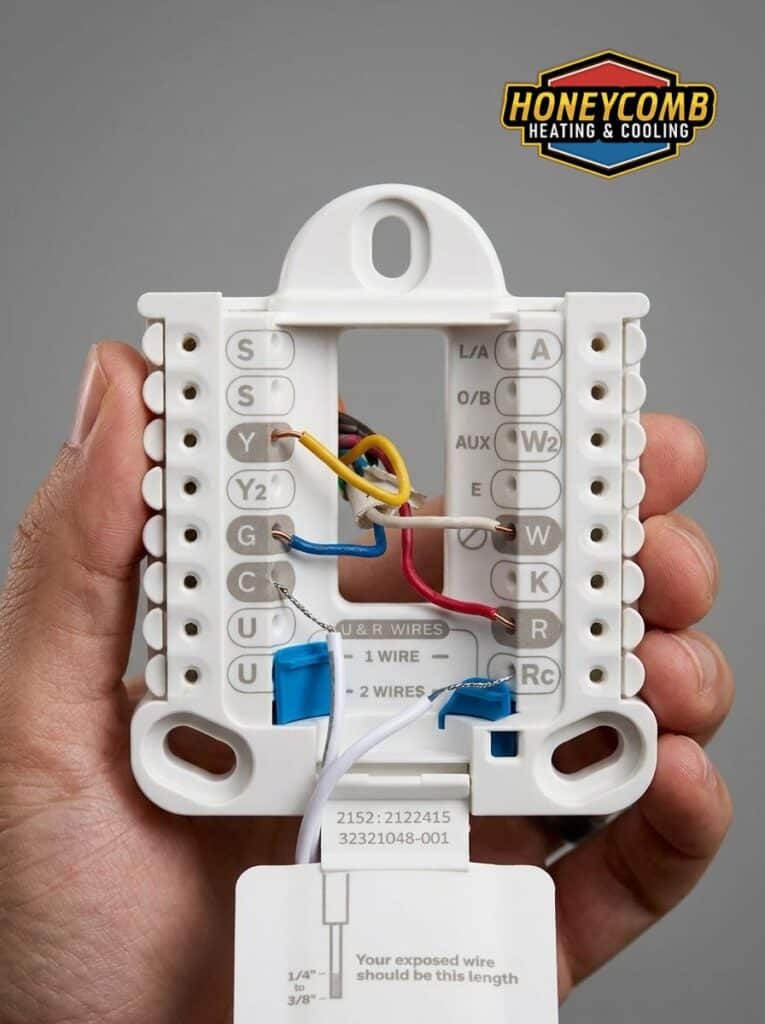
- Loose wiring causing signal interruptions — A partially disconnected wire produces inconsistent signals that the system interprets as start/stop commands.
Up to 4°F of error
The temperature measurement error that can be introduced when a thermostat is located near a supply vent, window, or external heat source. A peer-reviewed study in Building and Environment confirmed that placement relative to windows and heat sources is a primary driver of thermostat measurement uncertainty — directly causing thermostat-induced short cycling.
Source: NIH/PMC
Short Cycling vs. Thermostat-Induced Short Cycling: How to Tell
Sign #4: Your Energy Bills Are Rising Without a Change in Usage
An unexplained increase in your monthly energy bill — without a change in occupancy, weather patterns, or deliberate usage habits — is a quantifiable sign of thermostat malfunction. A miscalibrated or failing thermostat forces your HVAC system into extended, unnecessary run cycles. The U.S. Department of Energy estimates that thermostat calibration errors alone can increase heating and cooling costs by 10–20% annually.
Why This Sign Gets Ignored
Energy bills fluctuate for a dozen legitimate reasons — seasonal temperature shifts, rate increases from the utility company, guest occupancy, a new appliance. Because the causes are diffuse, most homeowners absorb bill increases without investigation.
The diagnostic key is month-over-month comparison against the same month in prior years, controlling for weather. If your July bill is 15% higher than last July and San Antonio experienced similar temperatures, the inefficiency is inside the system — and the thermostat is the most likely source because it’s the cheapest to verify and fix.
The Compounding Math of a Bad Setpoint Signal
Consider a thermostat reading 3°F low: it displays 72°F when the actual room temperature is 75°F. In cooling mode, the system interprets this as “still 3 degrees short of setpoint” and keeps running. The room is already at setpoint. The system is cooling air that is already cool — burning energy to hit a number it has already hit.
At the DOE’s estimate of 1% per degree per 8-hour period, a consistent 3°F error runs the system an extra 3% in every cooling cycle. Over a San Antonio summer — 90+ cooling days — that adds up to a measurable fraction of your annual bill attributable entirely to a sensor reading that costs $20 and 20 minutes to fix.
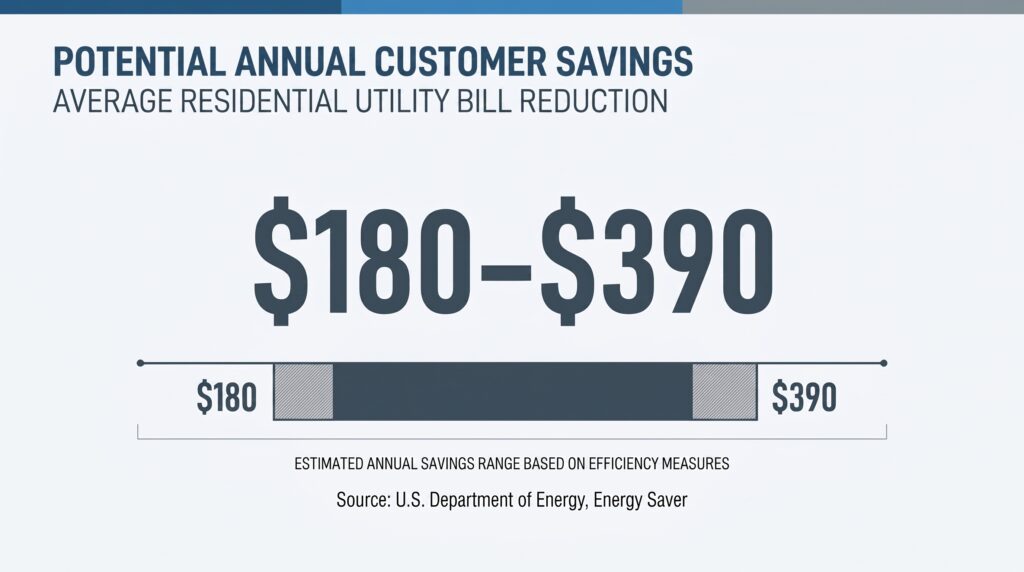
The average annual savings from properly programmed thermostat schedules in a typical U.S. household is estimated at $180- $390. This figure does not account for additional savings from corrected calibration — meaning the total recoverable value from thermostat optimization is higher for homes running on a miscalibrated unit with no schedule.
How to Isolate the Thermostat as the Cause
- Pull your utility bills for the same months last year and the year before. Look for a step-change increase that doesn’t track seasonal or rate variation.
- Run a 15-minute reference thermometer test (described in Sign #2 above). A variance of ≥2°F confirms calibration loss.
- Check your smart thermostat’s weekly runtime report if available. A well-maintained system in moderate San Antonio weather should not be running more than 2–3 cycles per hour. Sustained higher runtime with no change in setpoint is a direct signal of thermostat inaccuracy or short cycling.
- Replace or recalibrate. Track the next month’s bill against the prior year baseline. The energy savings are measurable within one billing cycle.
Sign #5: Blank Display, Frozen Screen, or Erratic Behavior
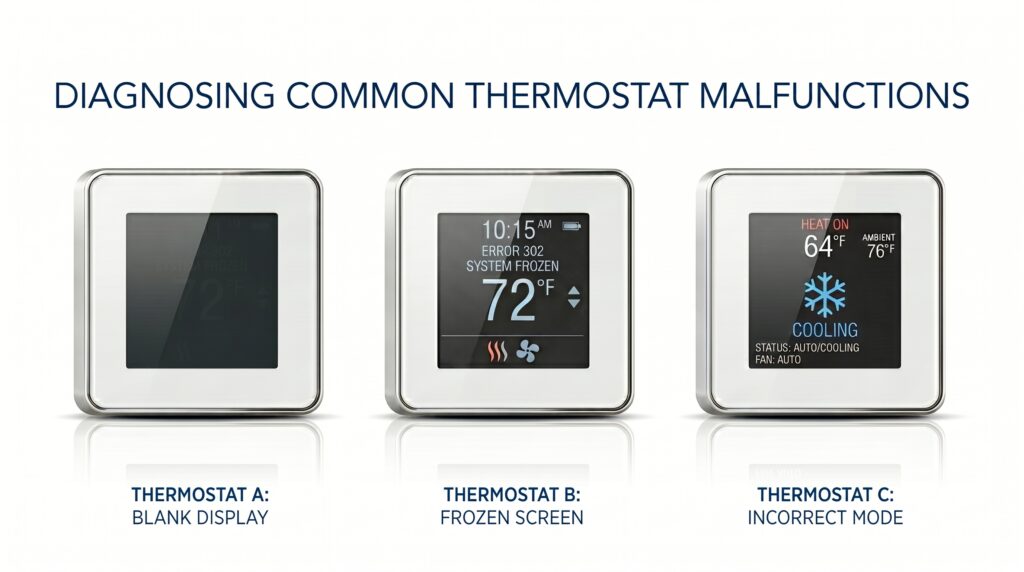
A blank display, a screen that freezes mid-update, or a thermostat that activates heating when you set it to cooling (or vice versa) are hardware failure signs — not calibration problems. These symptoms indicate a failing control board, depleted battery circuit, or corrupted firmware in smart thermostats. At this stage, calibration is not a viable fix. The thermostat needs to be replaced.
Blank or Frozen Display
The most benign cause is dead batteries. Replace them first — always. If the display remains blank after a fresh battery install, check the C-wire (common wire) connection. Many smart thermostat installations rely on a C-wire for continuous power; a disconnected or absent C-wire causes intermittent display failures that look like hardware faults but aren’t.
If a fresh battery install and verified C-wire connection don’t restore the display, the control board is failing. This is a terminal diagnosis for the thermostat.
Erratic or Ghost Commands
A thermostat that triggers heating when set to cooling, activates at wrong times, or shows temperature readings that jump 10°F in two minutes is exhibiting signs of control board failure or — in smart thermostats — corrupted firmware or a failed radio module.
For smart thermostats specifically, try these steps before replacement:
- Factory reset — Clears corrupted configuration data. On most Nest and Ecobee units, this is accessible in Settings → Reset → All Settings. Note: this erases your programmed schedule.
- Firmware update — Connect to Wi-Fi and force a firmware update check. Several documented Ecobee and Nest firmware bugs have caused erratic switching behavior that a firmware update resolves without hardware replacement.
- Check for radio interference — Smart thermostats operating on 2.4GHz Wi-Fi can experience intermittent disconnects that cause the unit to fall back to a default setting, mimicking erratic behavior. Move the router closer or switch to a 2.4GHz network if currently on 5GHz only.
If none of these resolve the behavior, replacement is the correct path. A thermostat exhibiting ghost commands is not a diagnostic ambiguity — it’s a liability to the equipment it controls.
10–15 years
The average functional lifespan of a residential thermostat, confirmed by Lennox (one of the largest U.S. HVAC manufacturers) and Angi’s 2026 homeowner cost data. Modern programmable and smart thermostats typically reach their performance ceiling at 10 years; older analog units can last up to 35 years but lack programmable efficiency features. Any unit approaching 10 years should be evaluated for replacement even without a dramatic failure event.
Sources: Lennox, Angi
What to Do Next: A Triage Framework
Once you’ve identified a symptom, the decision tree is straightforward: replace the batteries, run a reference thermometer test, inspect terminal connections, and attempt a calibration offset. If the problem persists through all four steps — or if you’re seeing erratic readings, blank displays, or a unit over 10 years old — replacement is the correct next move. A programmable thermostat starts at $25. A smart thermostat pays for itself in under 12 months in most climates.
| Symptom | First Step | If That Fails | Call a Pro When |
|---|---|---|---|
| HVAC won’t respond to commands | Replace batteries; check terminal connections | Check low-voltage fuse on air handler board | R-Y jumper test shows the equipment is fine but thermostat still won’t command it |
| Temperature reading is wrong | Reference thermometer test; calibration offset in settings | Relocate if near a vent, window, or heat source | Variance >5°F or readings are erratic/jumping |
| Short cycling | Check thermostat placement; inspect for vent proximity | Adjust heat anticipator (mechanical) or run R-Y bypass test | Short cycling persists after thermostat replacement (equipment fault) |
| Rising energy bills | Compare prior-year bills; run accuracy test | Calibrate or upgrade to a programmable/smart unit | Bills remain elevated after thermostat correction (duct leakage or equipment issue) |
| Blank display / erratic behavior | Replace batteries; check C-wire | Factory reset or firmware update (smart units) | Display remains blank after fresh batteries and C-wire verified |
If you’ve worked through the triage steps and the symptoms persist — or if your thermostat is over 10 years old and showing any combination of the signs above — the most cost-effective decision is replacement. A thermostat not working properly at the control-signal level affects everything downstream: equipment runtime, energy consumption, component wear, and comfort. Fixing the control signal first is always the right diagnostic priority.
Up to 26%
Average annual savings on heating and cooling costs reported by Ecobee customers based on internal analysis of over 200,000 North American households. At an average of $234/year saved, a $150 smart thermostat pays for itself in under 8 months.
Source: Ecobee
Calibrate vs. Replace: The Decision at a Glance
| Situation | Calibrate | Replace |
|---|---|---|
| Variance <3°F, digital unit, under 10 years old | Yes — offset in settings menu | Not yet necessary |
| Variance 3–5°F, offset available in settings | Try first | If offset doesn’t hold after 30 days |
| Mechanical (bimetallic) thermostat, any age | Clean first; try calibration screw | Strongly recommended — upgrade delivers schedule savings mechanical units can’t |
| Blank display, erratic behavior, ghost commands | No — hardware failure | Yes — immediately |
| Variance >5°F, any type | Unlikely to fully correct | Yes |
| Unit over 15 years old | Not worth the effort | Yes |
| No programmable schedule capability | Insufficient alone — can’t recover schedule savings | Yes — $25–$50 programmable replacement delivers $180–$390/yr savings |
Frequently Asked Questions
What are the signs that a thermostat is going bad?
The five most reliable signs are: (1) the HVAC system fails to respond to thermostat commands; (2) there is a persistent gap between the thermostat display and actual room temperature; (3) the system short cycles — running in 2–5 minute bursts instead of completing full 10–20 minute cycles; (4) energy bills rise without a change in usage habits or weather; and (5) the display is blank, frozen, or the thermostat triggers the wrong mode. Any single sign warrants a diagnostic check. Three or more signs in combination is a strong indication the unit needs replacement.
How do I know if my thermostat is broken or if my HVAC is broken?
The fastest diagnostic is the R-Y terminal bypass test: turn off power at the breaker, remove the thermostat cover, and briefly connect the R and Y wires directly together with a short piece of wire. Restore power. If the compressor activates, the HVAC equipment is functional and the thermostat is the fault. If the compressor still doesn’t activate, the problem is in the HVAC equipment or low-voltage wiring — not the thermostat. Always check the low-voltage fuse on the air handler control board before concluding the equipment itself has failed.
Can a bad thermostat cause high electric bills?
Yes — and it’s one of the most underdiagnosed sources of residential energy waste. A thermostat reading 3°F low in cooling mode keeps the system running after the actual setpoint has been reached, burning energy to cool air that is already cool. At the DOE’s estimate of 1% per degree per 8-hour period, a 3°F calibration error represents a 3% chronic efficiency loss that compounds daily across an entire cooling season. For a San Antonio home running 90+ cooling days per year, this is a material number on your CPS Energy bill.
How long do home thermostats last?
Most residential thermostats have a functional lifespan of approximately 10 years before sensor drift or control board degradation meaningfully affects accuracy. Mechanical (bimetallic) units can fail sooner due to physical wear on the bimetallic strip. Smart thermostats with active firmware support may last 10–15 years with periodic updates. Any thermostat over 10 years old showing accuracy issues should be replaced rather than recalibrated — the sensor drift is likely to continue accelerating past the correctable range.
What does thermostat short cycling mean?
Short cycling is when the HVAC system starts, runs for 2–5 minutes, shuts off before the room reaches setpoint, and immediately restarts. A properly sized system should complete 10–20 minute run cycles. Short cycling dramatically increases compressor wear because most of the electrical load during a compressor start occurs in the first 30 seconds of operation — far more than during steady-state running. Frequent short cycling accelerates this wear, shortens compressor life, and raises energy consumption. When the cause is a thermostat (misaligned anticipator, placement near a vent, or a failing sensor), it’s the cheapest possible short-cycling fix.
Is it worth repairing a thermostat or should I replace it?
For digital thermostats under 10 years old with a calibration variance under 5°F: attempt a calibration offset in the installer settings menu first. For mechanical thermostats, units over 10–15 years old, units with blank displays or erratic behavior, or any unit without a programmable schedule: replace. The economics are decisive — a programmable thermostat starts at $25–$50, a smart thermostat at $99–$249, and the DOE estimates $180–$390/year in savings from schedule programming alone. A $150 smart thermostat installation pays for itself in under 12 months for most U.S. households.
Why is my thermostat not reaching the set temperature?
There are three primary causes: (1) the thermostat is miscalibrated and reading the room temperature incorrectly — the setpoint looks unmet because the thermostat thinks the room is cooler or warmer than it actually is; (2) the thermostat is in a poor location — near a vent, window, or heat source that produces a false ambient temperature reading; or (3) the HVAC system itself is undersized or under-maintained for the load it’s asked to handle. Rule out the thermostat first with a reference thermometer test before calling for an equipment diagnostic.
What temperature should I set my thermostat in summer in San Antonio?
The U.S. Department of Energy recommends 78°F when home and awake, 85°F when away, and 82°F while sleeping as an energy-efficient summer baseline. In San Antonio’s climate — routinely 95–105°F through July and August — the away setforward from 78°F to 85°F delivers roughly 7% savings per away period. Ceiling fan use allows a 4°F effective setpoint increase with no perceived comfort loss, per Energy Star. Each degree above 78°F reduces cooling costs by approximately 1% per 8-hour period.
Need a Professional Thermostat Diagnosis or Replacement in San Antonio?
Honeycomb Heating & Cooling performs professional thermostat diagnostics, calibration, and smart thermostat installations across San Antonio and the surrounding area.
Upfront Flat-Rate Pricing · Zero-Pressure Options · Background-Checked Pros · 5.0 Stars on Google (600+ Reviews)
📞 Call or Text (210) 750-6725
Brandon Caputo
Owner · Honeycomb Heating & Cooling
Brandon Caputo founded Honeycomb Heating & Cooling to bring system-driven reliability and customer-first transparency to the San Antonio HVAC market. Grounded in the principle of proactive, preventative care rather than reactive crisis management, Honeycomb specializes in high-efficiency AC and heating installations, advanced diagnostic repairs, and localized indoor air quality solutions. Brandon infuses empathy into every service call, ensuring his team actively listens to homeowners to deliver clear, value-based comfort solutions.
About Honeycomb Heating & Cooling
San Antonio’s trusted specialist in residential air conditioning installation, swift repairs, and energy-saving preventative maintenance. Founded with a commitment to upfront flat-rate pricing and reliable home comfort.
600+ Completed Projects · 5.00-star Google Rating · Open 24/7 for Emergency Support · Founded by Brandon Caputo.
- Upfront Flat-Rate Pricing—No Hidden Fees
- Zero-Pressure Repair & System Options
- Background-Checked & Certified Technicians
- Amana Authorized Elite Partner
- Goodman High-Efficiency System Specialists
- Comprehensive “Comfy Club” Maintenance Programs
- 600+ 5-Star Reviews Across San Antonio
- Fully Licensed & Insured · Texas
- Free estimates & online booking
- Zero Interest with No Monthly Payment financing available
- Office Address: 26995 US Highway 281 Suite C, San Antonio, TX 78260
Sources & Citations
- Angi. (2026a). How long do thermostats last? Angi. https://www.angi.com/articles/how-long-thermostats-last.htm
- Angi. (2026b). How much does HVAC repair cost? Angi. https://www.angi.com/articles/how-much-hvac-repair-cost.htm
- Ecobee. (2026). Smart thermostat energy savings. Ecobee. https://www.ecobee.com/en-us/savings/
- Lennox. (2026). How long do thermostats last? Lennox Industries. https://www.lennox.com/residential/lennox-life/consumer/how-long-do-thermostats-last
- National Institutes of Health. (2021). Temperature sensing optimization for home thermostat retrofit (PMC8198709). National Center for Biotechnology Information. https://pmc.ncbi.nlm.nih.gov/articles/PMC8198709/
- TE Connectivity. (2018, February). NTC thermistor sensor performance: Application note [PDF file]. TE Connectivity Sensors. https://www.te.com/content/dam/te-com/documents/sensors/global/te-app-note-ntc-sensor-performance.pdf
- U.S. Department of Energy. (2026). Programmable thermostats. Energy Saver. https://www.energy.gov/energysaver/programmable-thermostats


